To start as a novice in Ragnarok Online, focus on allocating stats effectively for your intended first job, reaching Basic Skill level 9, and joining the Eden Group for tutorial quests and beginner resources.
Choosing Your Novice Type
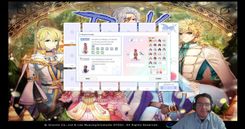
When beginning your journey in Ragnarok Online, players can choose between two novice types: Human and Doram. Humans can advance to any first job class except Summoner, while Dorams are limited to the Summoner class. Select your novice type in the initial creation menu.
prerequisites
- Choose between Human or Doram as your novice type.

Character creation allows selection between Human and Doram types, with style customization options. — GearGamingRO :::
Understanding Movement and Basic Gameplay Controls
Movement in Ragnarok Online is performed using left-click to navigate the map, rather than standard WASD controls. Frequently used interfaces like the menu (Alt + V), inventory (Alt + E), and skills (Alt + S) can be quickly accessed via hotkeys. Additionally, you can customize keybindings for faster interaction with your inventory items and skills.
If chat mode interferes with the use of these hotkeys, you can enter battle mode by typing /bm into the chat window. This allows more efficient access to hotkeys for combat.
steps
- Use the left-click to navigate the map.
- Access the menu interface using the
Alt + Vshortcut. - Open your inventory with
Alt + Eor your skills menu withAlt + S. - Configure hotkey shortcuts for quicker access to items and abilities.
- Activate battle mode using
/bmto improve access to skill shortcuts.
Stat Allocation Guidance
The distribution of stat points as a novice depends on the first job you plan to choose. Recommended allocations include Strength (STR) and Agility (AGI) for melee jobs, Intelligence (INT) for magic casters, and Dexterity (DEX) for accuracy. Early levels should emphasize Vitality (VIT) for survivability during combat.
Do research job-specific builds to understand secondary stats that will be useful for your intended path.
Stat Allocation Strategy
- Melee Jobs: Focus on STR, AGI, and VIT.
- Magic Casters: Emphasize INT for magic damage and SP pool.
- Ranged and accuracy-dependent builds: Increase DEX for better accuracy.
- Balance with VIT for sustainability in early-game hunting.

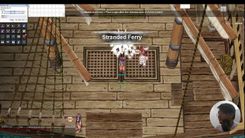
The game displays the stat allocation interface in the foreground. — GearGamingRO
Joining the Eden Group
The Eden Group is crucial for beginner players. To join, speak to Lime Evenor, the Eden Group Officer NPC. Accept her invitation to sign up, and you'll begin receiving tutorial quests. These quests offer invaluable rewards like beginner equipment, zeny, and consumable items like novice potions. Additionally, the group provides access to mission boards for early leveling.
When accepted into the Eden Group, you will also be presented with skills and items, such as the Eden Group Mark, which works similarly to a hearthstone, allowing you to return to designated locations quickly.
steps
- Speak to the Eden Group Officer NPC in the beginner area.
- Select the "Join Eden Group" option.
- Follow the prompts to complete the membership process and receive beginner items.

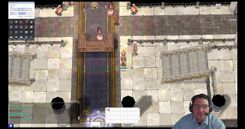
Lime Evenor's dialog offers information about joining Eden Group with player characters in the vicinity. — GearGamingRO
Learning Basic Skills
Basic Skill levels unlock key features and functions in the game, such as party creation and advanced menus. Focus on spending your skill points to raise Basic Skill to level 9. This threshold is critical to advance into your chosen first job. The points required to achieve this level can be acquired from quest rewards and leveling.
steps
- Open your skills menu (
Alt + S). - Allocate skill points to boost Basic Skill levels.
- Aim to reach level 9 Basic Skill to unlock party creation and access advanced features.
Navigating the World and Using the Navigation System
The navigation system is an invaluable tool for locating NPCs, monsters, and destinations in Ragnarok Online. The system provides a world map and search function, which helps players find specific monsters, locations, or quest goals.
steps
- Access the navigation system by clicking the map or designated navigation button.
- Use search queries to locate NPCs, monsters, or specific destinations. For example, type “Poring” to find its location.
- Follow the line markers on the mini-map to navigate the path to your objective.
Starting Equipment and Item Management
Novices receive starting gear from tutorial missions and the Eden Group. Equip items by double-clicking them or dragging them into their respective slots. Manage your inventory effectively to ensure space for loot collection. Excess items can be sold to NPCs for zeny, providing a source of income during early gameplay.
Using the Mission Boards and Early Missions
The Eden Group mission boards help novices level up efficiently. Choose kill quests targeting accessible beginner monsters, such as Lunatics and Fabres, and hunt them for experience, zeny, and items. Track active missions using the quest list interface.
steps
- Access the Eden Group mission board in the beginner area.
- Select kill quests targeting appropriate monsters for your novice level.
- Use the navigation system to locate monster maps efficiently.
- Complete the missions to earn experience, zeny, and better beginner equipment.
Going Forward
To progress in Ragnarok Online as a novice, focus on leveling via monster hunting and completing Eden Group missions. Once Basic Skill level 9 is achieved, you can proceed to change jobs based on your chosen class. Continue to utilize resources like the Eden Group, navigation system, and online guides for a smoother progression.
FAQ
What are the starting tips for novice players in Ragnarok Online?
As a novice, focus on allocating stats according to your intended job, leveling up Basic Skill, joining the Eden Group for resources, and utilizing the navigation system for efficient progression.
How do I allocate stats as a novice in Ragnarok Online?
Distribute points based on your first job choice. STR and AGI are ideal for melee classes; INT is best for magic casters, while DEX ensures accuracy for all builds. Balance points with VIT for early survivability.
What is the initial equipment for novices in Ragnarok Online?
Novices start with basic weapons and armor obtained through tutorial quests and Eden Group membership. These items are designed to provide survivability and utility during early gameplay.
How do I join Eden group in Ragnarok Online?
Talk to the Eden Group Officer NPC in the starting area, follow the dialogue prompts, and select the "Join Eden Group" option to begin accessing missions and rewards.
How does the navigation system work in Ragnarok Online?
The navigation system allows players to search for NPCs, monsters, and destinations. Enter the name of your target and follow the provided path on the mini-map or world map.
Sources
Screenshots on this page are frames from the videos below, used to illustrate the steps they describe. All rights remain with their creators.
- New Player Guide for Ragnarok Online — GearGamingRO, September 15, 2024