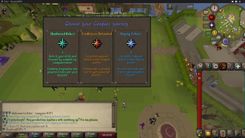
Start by accessing the 'progress' menu with the ::progress command to complete starter tasks for loot, claim and use the free beginner AoE orb for efficient monster farming, and leverage referral codes and daily voting rewards to secure upgrades and items.
Unlock Starter Bundles and Loot
New players on Fusion RSPS should activate the epic starter bundle upon joining. This bundle provides free loot that can be claimed periodically, giving players a valuable head start.
steps
- Use the interface to activate the epic starter bundle upon joining the server.
- Claim free loot at regular intervals as part of this bundle.

The Epic Bundle activation interface is displayed, showing the contents of the bundle. — jonnyd3vs
Complete Starter Progress Tasks
Progression tasks are essential for obtaining necessary rewards at the start of your journey in Fusion RSPS.
steps
- Access the player progress menu by typing the
::progresscommand. - Review the list of starter tasks provided.
- Complete these tasks to earn valuable rewards and accelerate your progression in the game.

The Player Progress Tasks menu display with a list of tasks and associated rewards. — jonnyd3vs
Utilize AoE Mechanics for Efficient Gameplay
Using the beginner AoE orb can significantly enhance your efficiency in monster farming.
steps
- Claim the free 3x3 AoE orb upon starting the game. Keep it in your inventory to enable AoE combat.
- Use
::instanceor Control+I to access the instance interface and spawn monsters in a 6x6 grid for faster farming. - Upgrade the AoE orb through evolving, increasing its area coverage up to a maximum of 10x10.
Claim Rewards Using Referral Codes
Referral codes are an easy way to access extra rewards when starting out on Fusion RSPS.
steps
- Use the
::refcommand to enter referral codes. - Enter codes such as Bond, Gold SP, Rect, Hideus, and Dragon Pets.
- The Dragon Pets code grants an additional pet alongside your main one, offering double benefits.

The game screen displays a prompt to enter a referral code in a text box. — jonnyd3vs
Maximize Voting Rewards
Daily voting provides consistent rewards that can significantly enhance your progression.
steps
- Use the
::votecommand to access the vote board. - Vote daily to unlock rewards such as mystery boxes and charms.
- Mystery boxes offer chances for best-in-slot items, while charms provide temporary stat bonuses.

The voting board displays daily voting rewards and claim options. — jonnyd3vs
Progress and Upgrade Your Items
Upgrading gear is a critical part of progressing in Fusion RSPS.
steps
- Open the item list interface via the quest tab or the
::itemscommand. - Explore gear options and plan upgrades based on item bonuses.
- Use resources from bosses and game events to enhance your existing gear.
Leverage Community Giveaways
Participate in community events and giveaways for a chance to earn store credits.
steps
- Join the Fusion Discord and engage with the #Media channel.
- Comment on YouTube videos shared in the Discord server using your in-game name.
- Use
::claimto redeem your winnings and::dealsto spend your store credits on valuable items.
Takeaway
Fusion RSPS offers great opportunities for new players through starter tasks, voting, and referral codes. By leveraging these mechanics efficiently, players can gain a solid foundation and progress rapidly in the game. Don't forget to take advantage of community giveaways for valuable rewards.
FAQ
how to start on Fusion RSPS
Start by activating the epic starter bundle for free loot and completing progression tasks using the ::progress command.
what are the beginner tasks on Fusion RSPS
Beginner tasks are listed under the ::progress menu and offer rewards that accelerate your early-game progress.
how to use AoE on Fusion RSPS
Claim the free AoE orb available at the start. Keep it in your inventory to enable a 3x3 AoE effect and upgrade it for larger coverage.
how to claim rewards with referral codes in Fusion RSPS
Use the ::ref command and enter referral codes like Bond, Gold SP, Rect, Hideus, and Dragon Pets to claim special rewards.
how to get best rewards from voting on Fusion RSPS
Vote daily via the ::vote command to earn mystery boxes, charms, and other progression-enhancing rewards.
Sources
Screenshots on this page are frames from the videos below, used to illustrate the steps they describe. All rights remain with their creators.
- NEW RSPS 2026 JUST RELEASED! Best Beginner Progression Guide - Fusion RSPS — jonnyd3vs, August 30, 2026